Many top designers in the textile and craft design field are now creating art discs that work beautifully with Stitch Painter, Photoshop and other paint programs. Some of the discs consist of artwork for garment or product illustration. Other discs are imagery discs, which contain artwork for sweaters or projects. The main file format is .JPG. We are also now offering some of our art discs with Illustrator vector files!
The art discs allow you the creative freedom to modify a number of things, depending on the file. Examples would be changing the garment shape, fill in the garment pattern with your textile and craft design, experiment with colors, preview ribbing colors or design a layout. Turn a cardigan into a pullover, change a sleeve length, and you needn’t stop there. Once you complete your design, you can print out the image.
What is an Art Disk,…. and how can I use it?
An Art disk is a diskette full of designs that are paint program files saved in a certain paint file language (e.g. ..JPG). To use an art disk you need to first load a paint program, then you may load any file from the disk. Always ensure that you have a paint program that uses the file format provided by the art disk. If you do not have one, you have two options;
Once you have loaded a file, there are many things you can do with it. You may:
1. Edit the drawings. Example: You may load a drawing of a basic garment, and then re-draw the neckline, the sleeve style or any other part of the garment. Tools: line tool, eraser, brush capture/selection tool
2. Create a ‘parts’ library of different sleeves, neckline, body parts, etc.
Tools: brush capture/selection tool of some sort and brush save; copy and paste functions with clipboard
3. Color in the image, experimenting with colorations. Tools: Typically, you use a paint fill/paint bucket tool in your paint program to do this.
4. Lay a fabric into the garment, and experiment with scale, layout and coloration. The paint program functions necessary for these operations are greater and more difficult to find. Look for ‘pattern fill’, tiling, etc. Tools: brush capture/selection, define pattern/pattern fill, rotate, and possibly a stencil tool in addition to basic paint tools.
5. Combine different drawings. Learn how to borrow the face of one model, and place it on another model. This allows you to create greater variations on the images you have and to customize them. Tools: selection, brush, copy and paste with clipboard, eraser, line tool and other basic paint tools.
Cochenille art Discs
Body Shapes
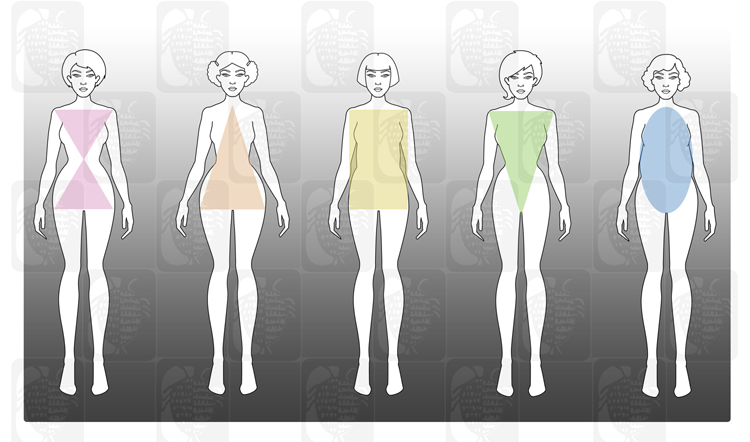 Cochenille’s Body Shapes are a collection of 5 different body silhouettes to fit the body shape you are designing for. Choose from Hourglass, Triangle shape, Brick shape, V shape or Oval Shape. We break them down into variations of each shape with Average, Heavy, Petite Average and Petite Heavy to suit a variety of body shapes and sizes. Each shape also has one image with and extended arm to assist you in showing design elements that may call for this. That is a total of 15 JPEG images and 15 Illustrator files!
These body shapes are an excellent way to sketch up ideas. When using the .ai files within Illustrator, elements within the layers can also be cut and copied so you can switch hair dos from one body shape to another. Designing your new looks are more versatile and exciting with Cochenille’ Illustrator Clip Art.
Sweater Bodies
 Cochenille has taken our first collection of Sweater Bodies and given them a makeover! Choose from 6 basic Sweaters, 6 Crew Sweaters or 9 Fashion Sweaters for a total of 21 sweaters!
If designing on the computer and you have our Stitch Painter program, you can incorporate those designs with this collection of sweaters to help visualize your final product. Open JPEG images with most any paint program to design on your computer. Print JPEG files to draw designs directly onto the image or place tracing paper over the image as a template for drawing one-of-a-kind garments. Illustrator files can be open with Abode Illustrator to make changes to your Sweater Bodies or Body Shapes.
Add or remove design elements or use these .ai files as a jumping off point to make a completely new image to fit you or someone you know. There are so many creative avenues to explore and Cochenille gives you the head start advantage with our new quality vector files and JPEG images.
RGB Art Disc
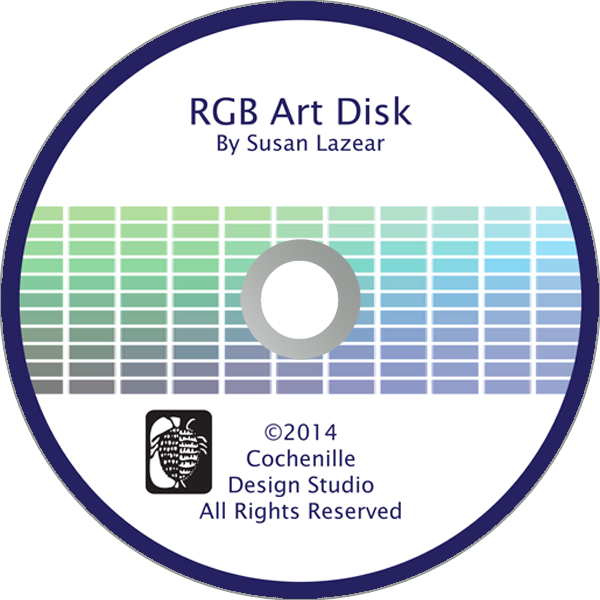 Do you have trouble mixing colors to match your yarns or threads? Does the R-G-B color theory baffle you? You need our RGB disk.
We have taken the time to create a visual display of more than 1,330 colors with R-G-B formula with them arranged to aid you in mixing colors.
Stitch Painter Clip Art
These sets of clip art are designed specifically for Stitch Painter. Each set contains .stc and .sbr files which will load directly into Stitch Painter.
Elements Collection: Quilts Blocks
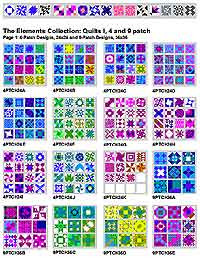 This Quilt set from the Elements Collection contains over 400 files composed of 30 Stitch Painter Document files, 30 .PNG files, and 348 motifs. You may use the motifs individually, or as building blocks to create a project.
If you are a quilter, you may design and plan your quilted fabrics. If you are a knitter or stitcher, you may use the quilt blocks to create quilt-look fabrics.
Use the motifs as designed, or let them be your starting point for creative play. Combine, edit or redesign them to suit your needs. Change the colors to your preferred combination.